Features
Workbook — open, create, save, sheetnames, add_worksheet, rename_worksheet, remove_worksheet, properties (title, author, created, …), orphan_partnames; opens .xlsm / .xltx too (VBA round-trips untouched)
Cells — typed value (str, int, float, bool, date, datetime), formula, clear, find / findall, offset, iter_cells, iter_rows
Styles — cell.style read (bold, colors, fonts, alignment, number format), apply_style, apply_date_format, apply_number_format
Layout — column_dimensions, row_dimensions, merge_cells, unmerge_cells, clear_range, write_rows, insert_rows, insert_columns
Links — cell.hyperlink.url, cell.hyperlink.location, cell.hyperlink.display
Images — add_image, images, Picture.replace, replace_image, insert_image_at_placeholder
Charts — add_chart, charts, to_anchor, offset_x/offset_y (post-create), read/set title, set_series_formula
Tables — add_table, tables, Table.resize
Conditional formatting — read blocks and rules; add_conditional_formatting (cellIs); add_color_scale_formatting
Search & replace — workbook/sheet replace (substring or whole-cell with value_type: text, number, date)
Bulk export — write_dataframe, write_rows, insert_rows, row_styles, column_styles; Workbook.open(..., large=True) for big files
Fidelity — round-trip tested on real fixtures: images, charts, tables, conditional formatting, merges, hyperlinks, custom sizes
Full feature reference →
Compared to other libraries
|
xlsxedit |
openpyxl |
xlsxwriter |
xlwings |
| Open existing file |
Yes (direct file) |
Yes |
No |
Yes (launches Excel) |
| Template fidelity |
Designed for preservation |
Often loses styles/charts/unknown XML |
N/A (create only) |
Depends on Excel |
| Headless / server / CI |
Yes |
Yes |
Yes |
No |
| Typical speed |
Fast direct I/O |
Moderate |
Fast (create) |
Slow (Excel startup + COM) |
| Excel app required |
No |
No |
No |
Yes |
Full comparison →
Install
pip install xlsxedit
pip install xlsxedit[pandas]   # optional: ExcelWriter / read_excel engine
AI coding agents — installable skill (Cursor / compatible agents):
npx skills add jonas-kupferschmid/xlsxedit --skill xlsxedit
Source: skills/xlsxedit/SKILL.md
Development:
pip install -e ".[dev]"
Quick start — fill a template
from xlsxedit import Workbook

wb = Workbook("invoice-template.xlsx")  # same as Workbook.open(...)
wb.replace("{client}", "Jonas Corp")
wb.replace("{amount}", 520, value_type="number")
wb.replace("{date}", "2025-08-07", value_type="date")
wb.save("invoice-filled.xlsx")
API showcase
from datetime import datetime
from xlsxedit import Workbook

wb = Workbook()  # new blank workbook; same as Workbook.create()
ws = wb["Sheet1"] # get worksheet by name

# set cell values
ws["A1"].value = "hello" # set cell value
ws["A2"].value = 42 # set cell value
ws["A3"].value = datetime(2025, 8, 7) # set cell value
ws["A3"].apply_date_format() # apply date format
ws["B1"].formula = "=A2*2" # set cell formula

# set column width and row height of worksheet
ws.column_dimensions["C"].width = 20.0
ws.row_dimensions[4].height = 30.0
ws.merge_cells("A1:C1") # merge cells

# insert_rows: insert one row at row 10 — writes A10="New line", B10=100; existing row 10+ shifts down
ws.insert_rows([["New line", 100]], at_cell="A10")

# insert_columns: insert one column at C — values top→bottom; existing C+ move right
ws.insert_columns([("Note", "detail")], at_col="C")

# write_rows: write at fixed rows without shifting (overwrites cells in that range)
ws.write_rows([["Total", 520]], at_cell="A20")

# add hyperlink
ws["D1"].value = "Docs"
ws["D1"].hyperlink.url = "https://xlsxedit.jonasruilong.com"

ws.add_image("logo.jpg", anchor="E2", width=180, height=135)
ws.add_chart("bar", anchor="G2", data_range="A1:B5", title="Sales")
# optional to_anchor (default: anchor + 6 cols × 13 rows, e.g. C19 → I32):
# ws.add_chart("bar", anchor="C19", to_anchor="H32", data_range="A1:B5")
ws.add_table("A1:B10", ["Item", "Qty"], name="Items")
ws.add_conditional_formatting("A2:A20", operator="greaterThan", formula="0")

report = wb.add_worksheet("Report")
wb.rename_worksheet("Report", "Summary")

wb.replace("PLACEHOLDER", "Jonas Corp")
wb.replace("{qty}", 888, value_type="number")
wb.save("out.xlsx")
See tutorial/run_tutorial.py for a full walkthrough.
Bulk export (many rows)
wb = Workbook("report-template.xlsx")  # same as Workbook.open(...)
wb.write_dataframe(
    df,
    at_cell="A5",
    header=False,
    mode="overwrite",
    row_styles=[{"bg_color": "FFFFFFFF"}, {"bg_color": "FF9DC3E6"}],
)
wb.save("report.xlsx")
Tutorials: tutorial/pandas_tutorial.py (pandas engine), tutorial/run_tutorial.py, tutorial/export_pandas_example.py (advanced bulk), tutorial/bench_large_export.py
Pandas quick start
import pandas as pd
import xlsxedit.pandas_io as xpi

xpi.register()  # once per process

df = pd.DataFrame({"Item": ["Widget", "Gadget"], "Qty": [2, 5]})

with pd.ExcelWriter("out.xlsx", engine="xlsxedit") as writer:
    df.to_excel(writer, sheet_name="Data", index=False)

got = pd.read_excel("out.xlsx", engine="xlsxedit")
Opt-in engine today (register()); a future pandas PR may add official reader registration. Full docs: Pandas engine. Tutorial: tutorial/pandas_tutorial.py.
When to use / when not
Use xlsxedit when:
- Filling styled Excel templates from Python
- You need charts, images, or layout to survive after edits
- Running headless on a server or in CI without Excel installed
Use something else when:
- You need live Excel recalc, VBA, or UI automation → xlwings
- You only create new workbooks from scratch → xlsxwriter
- You need pivot editing or every openpyxl feature today → openpyxl (xlsxedit API is still growing)
Missing something? Open an issue — the API grows from real use cases.
I made this library for my use cases, I didn't need to create new charts or conditional formatting from scratch, so that area stayed minimal. It should still work with existing charts and conditional formatting in the template. Excel has many features and it would be too much to implement all of them, but if you need something that is not supported, please open an issue and I can implement it.
If you every come across a bug or if it says file is corrupted, please let me know and I will fix it as well.
xlsxedit is free and open source under the Apache License 2.0 — you can use it anywhere, including in commercial and closed-source products, at no cost.
If xlsxedit saves you or your company real time, consider sponsoring it — it's what keeps the project maintained and improving. There's no fixed price: pay what it's worth to you. Bigger companies more, smaller ones less.
Or, even better — give me a job. I'm Jonas, the person behind xlsxedit. I'll be honest: I'm a little desperate — not for money, but to hopefully live in the same city as the person I love, instead of continents away.
Acknowledgments
xlsxedit owes a lot to Steve Canny (scanny) and python-docx. I loved his idea of editing Word documents surgically — patch the package, leave the design intact — and wanted the same thing for Excel. (When I started to use python-docx, I researched it extensively to understand how it works) That inspiration is why xlsxedit exists.
The OPC package layer (src/xlsxedit/opc/** and src/xlsxedit/oxml/parser.py) is adapted from python-docx and python-pptx (MIT licensed, Copyright (c) 2013 Steve Canny). That notice is in NOTICE and THIRD_PARTY_LICENSES. xlsxedit is independent and not affiliated with those projects — but thank you, Steve, for the foundation.
License
xlsxedit is licensed under the Apache License 2.0. Portions adapted from python-docx / python-pptx remain under their original MIT license; see NOTICE and THIRD_PARTY_LICENSES. Contributions are accepted under the Contributor License Agreement — see CONTRIBUTING.md.
Example projects
Small companion repos for common workflows:
- xlsx-sar-test — Weekly Download Report hero demo:
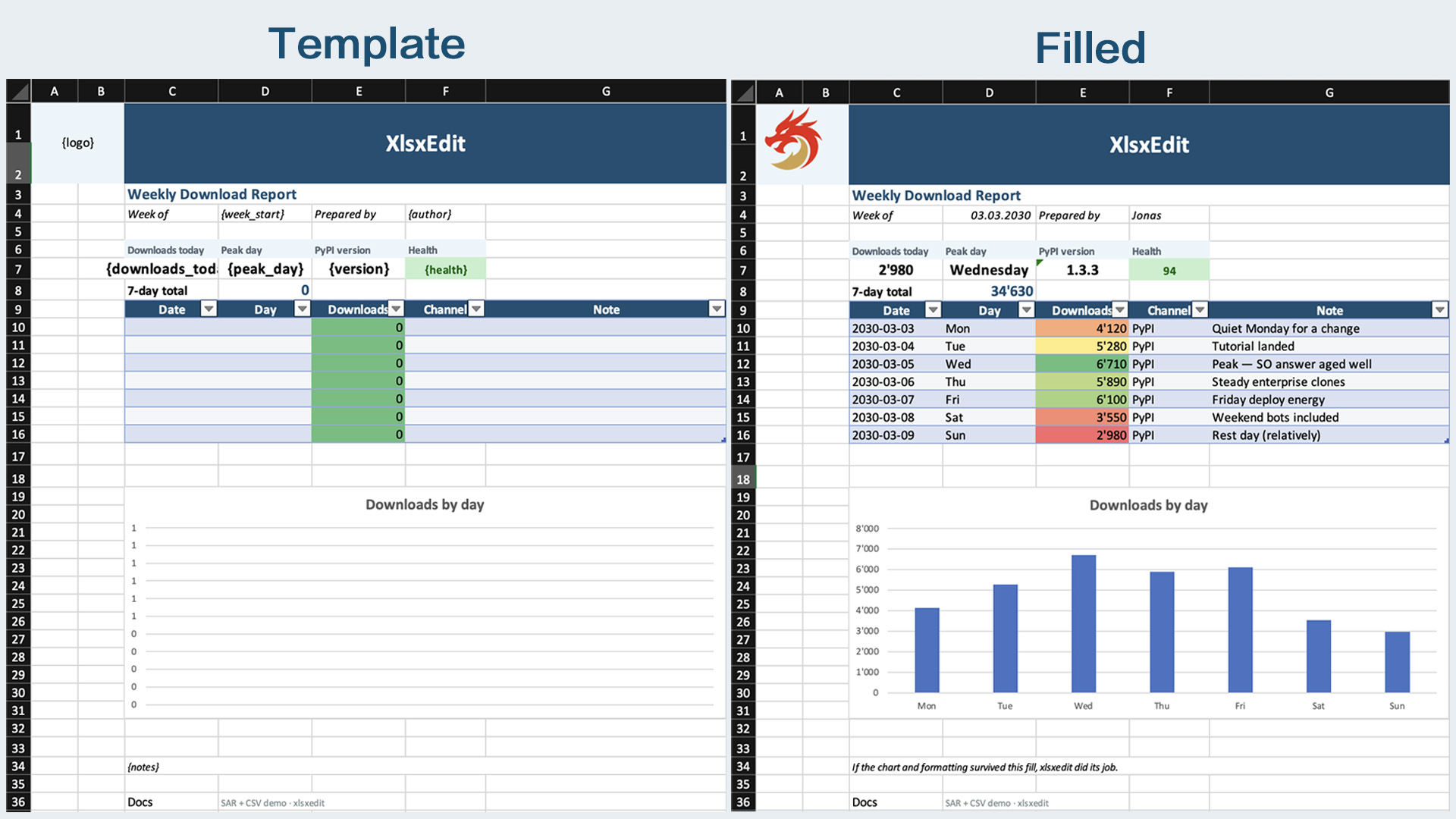
build_template.py builds a styled template (logo, table, chart, CF); run_demo.py fills header/KPI placeholders from sar.yaml and bulk-inserts the daily table from CSV — chart and layout survive. SAR-only: apply_sar.py
- xlsx-inspect — unpack
.xlsx files into pretty-printed XML folders and pack them back; useful to see what is inside a workbook on disk